

Architecture
Core Concepts of React
The React library is built on a strong foundation. It is simple, flexible, and extensible. As discussed earlier, React is a library used to create user interfaces for web applications. Its primary goal is to allow developers to build UIs using pure JavaScript.
Most UI libraries introduce a new template language that developers must learn and then provide ways to mix logic with templates. React takes a different approach. Instead of introducing a new template language, React is based on three simple core concepts.
React Elements
React elements are JavaScript representations of HTML DOM elements. React provides the React.createElement() API to create these elements. React elements describe what should appear on the screen.
JSX
JSX is a JavaScript syntax extension used to design user interfaces. It is XML-based and looks very similar to HTML, with small differences. JSX is compiled into React elements before execution and makes UI code easier to read and write.
React Components
React components are the building blocks of a React application. A component uses React elements and JSX to define the UI.
A React component can be:
A JavaScript class (extending React.Component)
A plain JavaScript function
Components support:
Properties (props)
State management
Lifecycle methods
Event handling
Simple to complex logic
Components make React applications modular, reusable, and easy to maintain.
Architecture of a React Application
React is only a UI library, so it does not enforce a specific architecture for building applications. Developers are free to choose their own design patterns. However, the React community promotes certain patterns such as Flux.
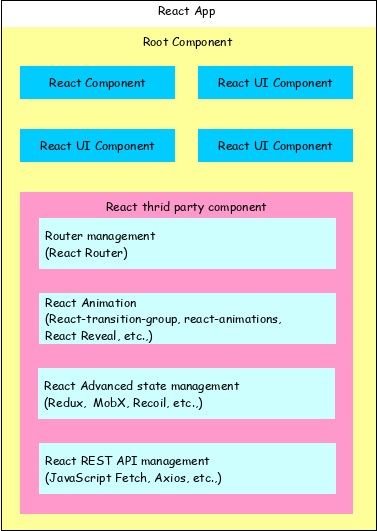
High-Level Structure of a React Application
A React application starts with a single root component
The root component is built using multiple smaller components
Components can be nested to any depth
React favors composition over inheritance
Most components focus on user interface
Third-party components can be added for routing, animation, state management, and more
Workflow of a React Application
Let’s understand the workflow by building a simple React application.
Step 1: Create Project Files
Open a command prompt and navigate to your workspace:
cd /go/to/your/workspace
Create a folder and move into it:
mkdir static_site cd static_site
Step 2: Create a Simple React App
Create a file named hello.html and add the following code:
Step 3: Serve the Application
Run the following command:
serve ./hello.html
Open a browser and visit:
http://localhost:3000
You will see:
Hello React
Understanding the Code
This example uses three main React APIs:
React.createElement()
Used to create React elements. It accepts:
HTML tag
Attributes object
Content (can include nested elements)
ReactDOM.createRoot()
Creates the main container for rendering the React application.
root.render()
Renders a React element or JSX into the container.
Nested React Elements
Since React.createElement() supports nesting, React can generate this structure:
Hello React!
Using JSX Instead of createElement()
Now let’s replace React elements with JSX.
Here:
Babel converts JSX into JavaScript
type="text/babel" enables JSX processing
Output:
Hello JSX
Creating a React Component Using JSX
Output remains the same:
Hello JSX
By analyzing the application, we can visualize the workflow of the React application as shown in the below diagram.
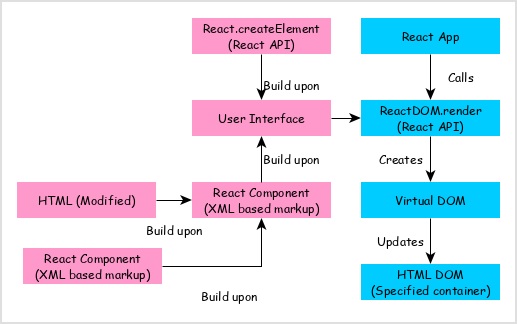
React app calls ReactDOM.render method by passing the user interface created using React component (coded in either JSX or React element format) and the container to render the user interface.
ReactDOM.render processes the JSX or React element and emits Virtual DOM.
Virtual DOM will be merged and rendered into the container.