

Intents and Filters
Intents and Filters
An Android Intent is an abstract description of an operation to be performed. It can be used with startActivity to launch an Activity, broadcastIntent to send it to any interested BroadcastReceiver components, and startService(Intent) or bindService(Intent, ServiceConnection, int) to communicate with a background Service.
The intent itself, an Intent object, is a passive data structure holding an abstract description of an operation to be performed.
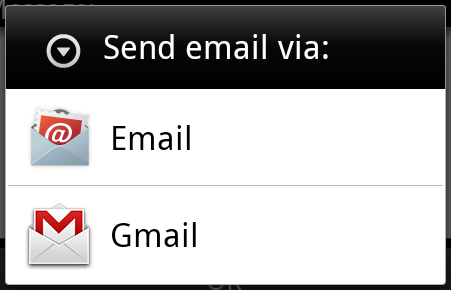
Above syntax is calling startActivity method to start an email activity and result should be as shown below −
There are separate mechanisms for delivering intents to each type of component − activities, services, and broadcast receivers.
| Sr.No | Method & Description |
|---|---|
| 1 | Context.startActivity() The Intent object is passed to this method to launch a new activity or get an existing activity to do something new. |
| 2 | Context.startService() The Intent object is passed to this method to initiate a service or deliver new instructions to an ongoing service. |
| 3 | Context.sendBroadcast() The Intent object is passed to this method to deliver the message to all interested broadcast receivers. |
Intent Objects
An Intent object is a bundle of information which is used by the component that receives the intent as well as information used by the Android system.
An Intent object can contain the following components based on what it is communicating or going to perform −
Action
This is mandatory part of the Intent object and is a string naming the action to be performed or, in the case of broadcast intents, the action that took place and is being reported. The action largely determines how the rest of the intent object is structured . The Intent class defines a number of action constants corresponding to different intents. Here is a list of Android Intent Standard Actions
The action in an Intent object can be set by the setAction() method and read by getAction().
Data
Adds a data specification to an intent filter. The specification can be just a data type (the mimeType attribute), just a URI, or both a data type and a URI. A URI is specified by separate attributes for each of its parts −
These attributes that specify the URL format are optional, but also mutually dependent −
- If a scheme is not specified for the intent filter, all the other URI attributes are ignored.
- If a host is not specified for the filter, the port attribute and all the path attributes are ignored.
The setData() method specifies data only as a URI, setType() specifies it only as a MIME type, and setDataAndType() specifies it as both a URI and a MIME type. The URI is read by getData() and the type by getType().
Category
The category is an optional part of Intent object and it's a string containing additional information about the kind of component that should handle the intent. The addCategory() method places a category in an Intent object, removeCategory() deletes a category previously added, and getCategories() gets the set of all categories currently in the object. Here is a list of Android Intent Standard Categories
You can check detail on Intent Filters in below section to understand how do we use categories to choose appropriate activity corresponding to an Intent.
Extras
This will be in key-value pairs for additional information that should be delivered to the component handling the intent. The extras can be set and read using the putExtras() and getExtras() methods respectively. Here is a list of Android Intent Standard Extra Data
Flags
These flags are optional part of Intent object and instruct the Android system how to launch an activity, and how to treat it after it's launched etc.
| Sr.No | Flags & Description |
|---|---|
| 1 | FLAG_ACTIVITY_CLEAR_TASK If set in an Intent passed to Context.startActivity(), this flag will cause any existing task that would be associated with the activity to be cleared before the activity is started. That is, the activity becomes the new root of an otherwise empty task, and any old activities are finished. This can only be used in conjunction with FLAG_ACTIVITY_NEW_TASK. |
| 2 | FLAG_ACTIVITY_CLEAR_TOP If set, and the activity being launched is already running in the current task, then instead of launching a new instance of that activity, all of the other activities on top of it will be closed and this Intent will be delivered to the (now on top) old activity as a new Intent. |
| 3 | FLAG_ACTIVITY_NEW_TASK This flag is generally used by activities that want to present a "launcher" style behavior: they give the user a list of separate things that can be done, which otherwise run completely independently of the activity launching them. |
Component Name
This optional field is an android ComponentName object representing either Activity, Service or BroadcastReceiver class. If it is set, the Intent object is delivered to an instance of the designated class otherwise Android uses other information in the Intent object to locate a suitable target.
The component name is set by setComponent(), setClass(), or setClassName() and read by getComponent().
Types of Intents
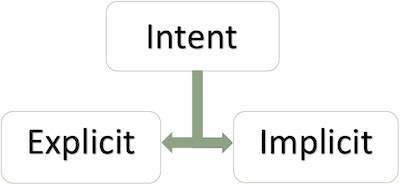
There are following two types of intents supported by Android
Explicit Intents
Explicit intent going to be connected internal world of application,suppose if you wants to connect one activity to another activity, we can do this quote by explicit intent, below image is connecting first activity to second activity by clicking button.
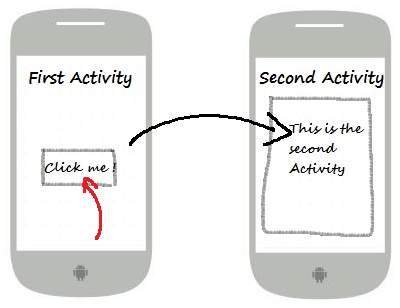
These intents designate the target component by its name and they are typically used for application-internal messages - such as an activity starting a subordinate service or launching a sister activity. For example −
// Explicit Intent by specifying its class name Intent i = new Intent(FirstActivity.this, SecondActivity.class); // Starts TargetActivity startActivity(i);
Implicit Intents
These intents do not name a target and the field for the component name is left blank. Implicit intents are often used to activate components in other applications. For example −
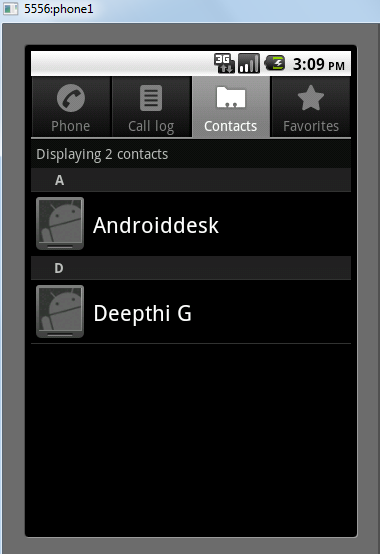
Intent read1=new Intent(); read1.setAction(android.content.Intent.ACTION_VIEW); read1.setData(ContactsContract.Contacts.CONTENT_URI); startActivity(read1);
Above code will give result as shown below
The target component which receives the intent can use the getExtras() method to get the extra data sent by the source component. For example −
// Get bundle object at appropriate place in your code Bundle extras = getIntent().getExtras(); // Extract data using passed keys String value1 = extras.getString("Key1"); String value2 = extras.getString("Key2");