

AJAX
Introduction to AJAX
AJAX is a technique that allows parts of a web page to update without refreshing the entire page. This results in faster, smoother, and more interactive web applications.
What is AJAX?
AJAX stands for Asynchronous JavaScript and XML.
It is not a programming language, but a set of web development techniques used to create dynamic and responsive web pages.
With AJAX, a web page can communicate with the server in the background, exchange small amounts of data, and update only the required section of the page. Traditional web pages must reload the whole page whenever data changes.
Popular applications that use AJAX include Google Maps, Gmail, YouTube, and Facebook tabs.
How AJAX Works
AJAX allows data to be sent to and retrieved from a server asynchronously, meaning the user can continue interacting with the page while data is being processed.
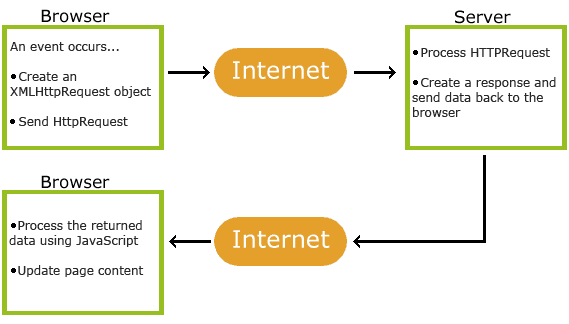
AJAX is Based on Web Standards
AJAX relies on standard web technologies working together:
XMLHttpRequest – sends and receives data asynchronously
JavaScript & DOM – handles user interaction and updates page content
CSS – styles the content
XML – commonly used data format for transfer
AJAX applications work across different browsers and platforms.
Google Suggest and AJAX
AJAX gained popularity in 2005 when Google introduced Google Suggest.
As users type in the search box, JavaScript sends the typed characters to the server, and the server responds with a list of suggested search terms—without reloading the page.
Getting Started with AJAX in ASP
In this ASP tutorial, AJAX is used to demonstrate how parts of a web page can be updated dynamically. The server-side scripts are written in ASP.
For deeper learning, you can explore a dedicated AJAX tutorial.
AJAX ASP Example
This example shows how a web page communicates with the server while the user types in an input field.
Example
Start typing a name in the input field below:
Suggestions:
ASP File – gethint.asp
The ASP file processes the input and returns matching names from an array.
<% Response.Expires = -1 Dim a(30) a(1)="Anna" a(2)="Brittany" a(3)="Cinderella" a(4)="Diana" a(5)="Eva" a(6)="Fiona" a(7)="Gunda" a(8)="Hege" a(9)="Inga" a(10)="Johanna" a(11)="Kitty" a(12)="Linda" a(13)="Nina" a(14)="Ophelia" a(15)="Petunia" a(16)="Amanda" a(17)="Raquel" a(18)="Cindy" a(19)="Doris" a(20)="Eve" a(21)="Evita" a(22)="Sunniva" a(23)="Tove" a(24)="Unni" a(25)="Violet" a(26)="Liza" a(27)="Elizabeth" a(28)="Ellen" a(29)="Wenche" a(30)="Vicky" q = UCase(Request.QueryString("q")) If Len(q) > 0 Then hint = "" For i = 1 To 30 If q = UCase(Mid(a(i),1,Len(q))) Then If hint = "" Then hint = a(i) Else hint = hint & " , " & a(i) End If End If Next End If If hint = "" Then Response.Write("no suggestion") Else Response.Write(hint) End If %>
AJAX Database Example
The following example will demonstrate how a web page can fetch information from a database with AJAX:
Example
<
ASP File – getcustomer.asp
This ASP file queries the database and returns the results in a table.
<% Response.Expires = -1 sql = "SELECT * FROM CUSTOMERS WHERE CUSTOMERID='" sql = sql & Request.QueryString("q") & "'" Set conn = Server.CreateObject("ADODB.Connection") conn.Provider = "Microsoft.Jet.OLEDB.4.0" conn.Open(Server.MapPath("/datafolder/northwind.mdb")) Set rs = Server.CreateObject("ADODB.Recordset") rs.Open sql, conn Response.Write("
| " & x.Name & " | ") Response.Write("" & x.Value & " |