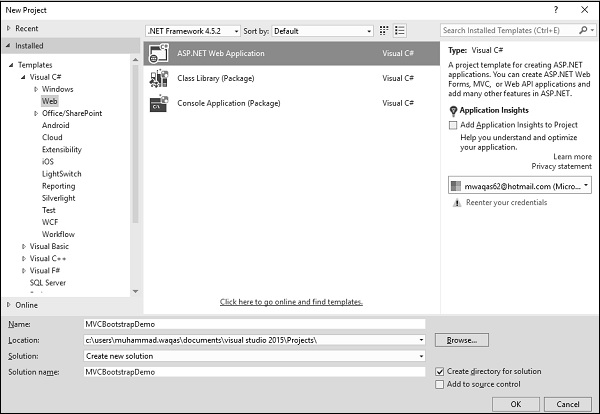
Lets create a new ASP.NET Web Application.
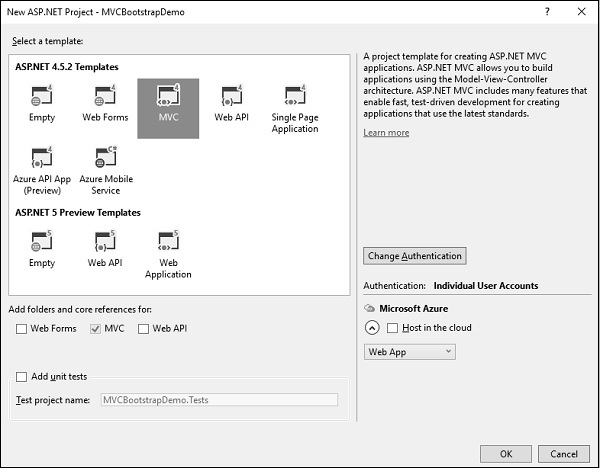
Enter the name of the project, lets say MVCBootstrap and click Ok. You will see the following dialog.
In this dialog, if you select the empty template, you will get an empty web application and there will be no Bootstrap present. There won't be any controllers or any other script files either.
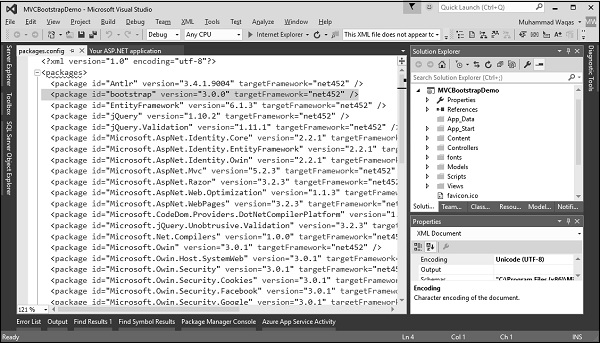
Now select the MVC template and click Ok. When Visual Studio creates this solution, one of the packages that it will download and install into the project will be the Bootstrap NuGet package. You can verify by going to packages.config and you can see the Bootstrap version 3 package.
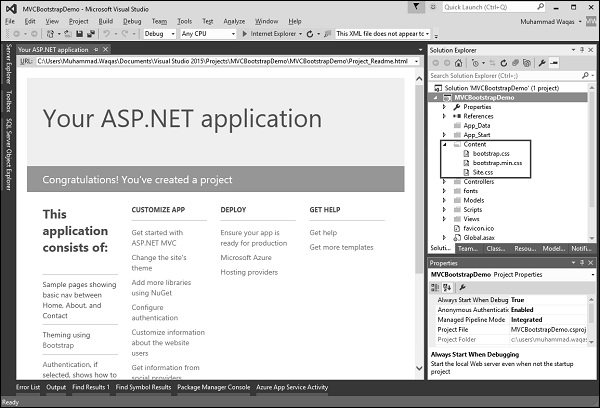
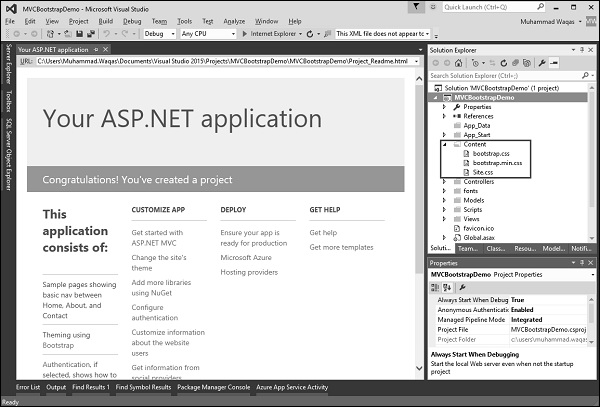
You can also see the Content folder which contains different css files.
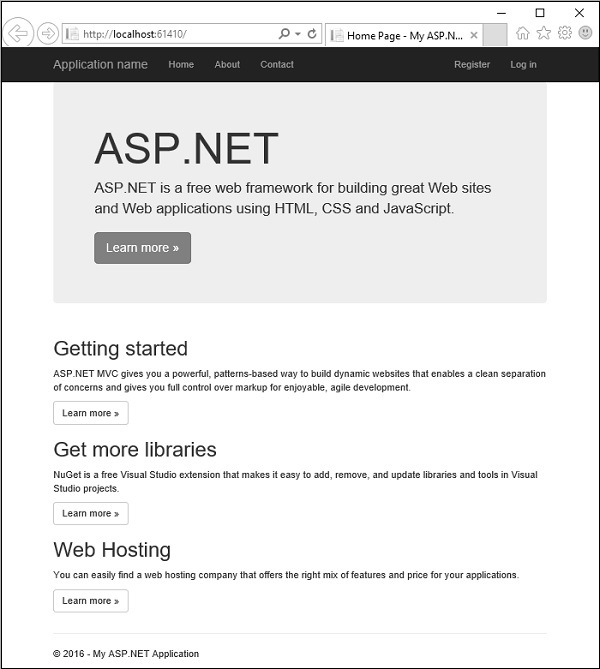
Run this application and you will see the following page.
When this page appears, most of the layout and styling that you see is layout and styling that has been applied by Bootstrap. It includes the navigation bar at the top with the links as well as the display that is advertising ASP.NET. It also includes all of these pieces down about getting started and getting more libraries and web hosting.
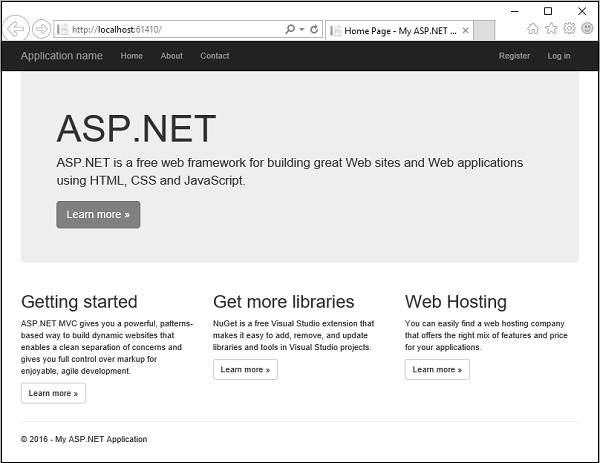
If you expand the browser just a little bit more, those will actually lay out side by side and that's part of Bootstrap's responsive design features.
If you look under the content folder, you will find the Bootstrap.css file.
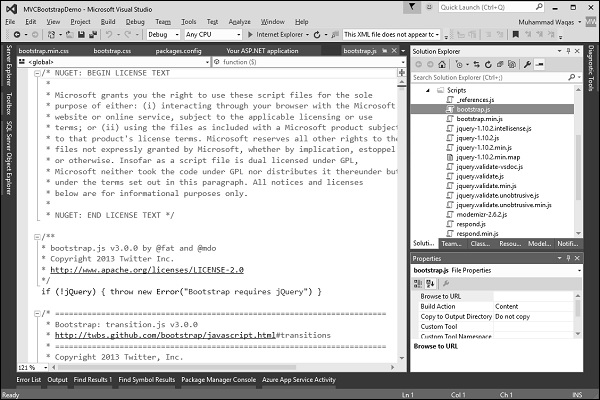
The NuGet package also gives a minified version of that file that's a little bit smaller. Under scripts, you will find Bootstrap.js, that's required for some of the components of Bootstrap.
It does have a dependency on jQuery and fortunately jQuery is also installed in this project and there's a minified version of the Bootstrap JavaScript file.
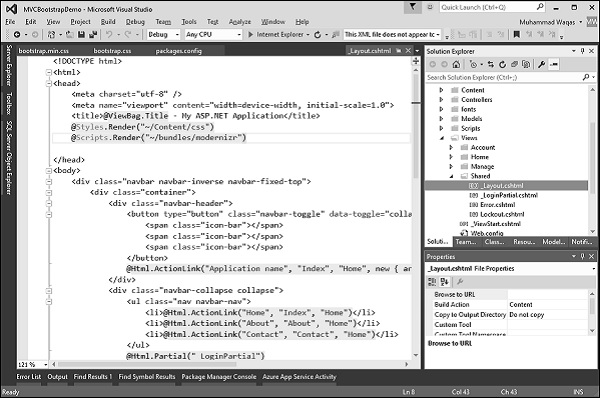
Now the question is, where are all these added in the application? You might expect, that it would be in the layout template, the layout view for this project which is under View/Shared/_layout.cshtml.
The layout view controls the structure of the UI. Following is the complete code in _layout.cshtml file.
@ViewBag.Title - My ASP.NET Application
@Styles.Render("~/Content/css")
@Scripts.Render("~/bundles/modernizr")
@Html.ActionLink("Home", "Index", "Home")
@Html.ActionLink("About", "About", "Home")
@Html.ActionLink("Contact", "Contact", "Home")
@Html.Partial("_LoginPartial")
@Scripts.Render("~/bundles/jquery")
@Scripts.Render("~/bundles/bootstrap")
@RenderSection("scripts", required: false)
In the above code there are two things to note. First at the top, after
you will see the following line of code.</p><p>@Styles.Render("~/Content/css")
</p><p>The Styles.Render for Content/css is actually where the Bootstrap.css file is going to be included, and at the bottom, you will see the following line of code.</p><p>@Scripts.Render("~/bundles/bootstrap")
</p><p>It is rendering the Bootstrap script. So in order to find out what exactly is inside of these bundles, we'll have to go into the BundleConfig file, which is in App_Start folder.</p><figure class="image"><img src="https://www.tutorialspoint.com/asp.net_mvc/images/bundleconfig_file.jpg" alt="BundleConfig File"></figure><p>In BundleConfig, you can see at the bottom that the CSS bundle includes both Bootstrap.css and our custom site.css.</p><p>bundles.Add(new StyleBundle("~/Content/css").Include(
"~/Content/bootstrap.css",
"~/Content/site.css"));
</p><p>It is a place where we can add our own style sheets to customize the look of the application. You can also see the Bootstrap bundle that appears before the CSS bundle that includes Bootstrap.js, and another JavaScript file, respond.js.</p><p>bundles.Add(new ScriptBundle("~/bundles/bootstrap").Include(
"~/Scripts/bootstrap.js",
"~/Scripts/respond.js"));
</p><p>Lets comment Bootstrap.css as shown in the following code.</p><p>bundles.Add(new StyleBundle("~/Content/css").Include(
//"~/Content/bootstrap.css",
"~/Content/site.css"));
</p><p>Run this application again, just to give you an idea of what Bootstrap is doing, because now the only styles that are available are the styles that are in site.css.</p><figure class="image"><img src="https://www.tutorialspoint.com/asp.net_mvc/images/styles_in_site_css.jpg" alt="Styles in site.css"></figure><p>As you can see we lost the layout, the navigation bar at the top of the page. Now everything looks ordinary and boring.</p><p>Let us now see what Bootstrap is all about. There's a couple of things that Bootstrap just does automatically and there's a couple of things that Bootstrap can do for you when you add classes and have the right HTML structure. If you look at the _layout.cshtml file, you will see the navbar class as shown in the following code.</p><p><div class = "navbar navbar-inverse navbar-fixed-top">
<div class = "container">
<div class = "navbar-header">
<button type = "button" class = "navbar-toggle" datatoggle =
"collapse" data-target = ".navbar-collapse">
<span class = "icon-bar"></span>
<span class = "icon-bar"></span>
<span class = "icon-bar"></span>
</button>
<a class = "navbar-brand" href = "/">Application name</a>
</div>
<div class = "navbar-collapse collapse">
<ul class = "nav navbar-nav">
<li><a href = "/">Home</a></li>
<li><a href = "/Home/About">About</a></li>
<li><a href = "/Home/Contact">Contact</a></li>
</ul>
<ul class = "nav navbar-nav navbar-right">
<li><a href = "/Account/Register" id = "registerLink">Register</a></li>
<li><a href = "/Account/Login" id = "loginLink">Log in</a></li>
</ul>
</div>
</div>
</div>
</p><p>It is CSS classes from Bootstrap like navbar, navbar inverse, and navbar fixed top. If you remove a few of these classes like navbar inverse, navbar fixed top and also uncomment the Bootstrap.css and then run your application again, you will see the following output.</p><figure class="image"><img src="https://www.tutorialspoint.com/asp.net_mvc/images/css_classes.jpg" alt="CSS classes"></figure><p>You will see that we still have a navbar, but now it's not using inverse colors so it's white. It also doesn't stick to the top of the page. When you scroll down, the navigation bar scrolls off the top and you can no longer see it again.</p><figure class="image"><img src="https://www.tutorialspoint.com/asp.net_mvc/images/navbar.jpg" alt="Navbar"></figure><p><br> </p>
</div>
</section>
</main>
</div>
</div>
</div>
</div>
<!-- ════════════════════════════════════════
OFFCANVAS TOPICS (MOBILE)
════════════════════════════════════════ -->
<div class="offcanvas offcanvas-start" tabindex="-1" id="techTopicsOffcanvas"
aria-labelledby="techTopicsOffcanvasLabel">
<div class="offcanvas-header">
<div>
<div class="text-uppercase small text-muted fw-bold">Technology</div>
<h5 class="offcanvas-title mb-0" id="techTopicsOffcanvasLabel">
Asp.Net MVC
</h5>
</div>
<button type="button" class="btn-close"
data-bs-dismiss="offcanvas" aria-label="Close"></button>
</div>
<div class="offcanvas-body pt-0">
<div class="list-group">
<a class="list-group-item list-group-item-action "
href="/home/technologies?technologyId=75a6d924-bcab-4040-9586-21a40e1c306a&topicId=82412e1d-2ffb-43f3-9c37-5725abb95f2d"
data-bs-dismiss="offcanvas">
Home
</a> <a class="list-group-item list-group-item-action "
href="/home/technologies?technologyId=75a6d924-bcab-4040-9586-21a40e1c306a&topicId=d018dd96-cce1-4c82-ae4b-16ea3cd8cafa"
data-bs-dismiss="offcanvas">
Overview
</a> <a class="list-group-item list-group-item-action "
href="/home/technologies?technologyId=75a6d924-bcab-4040-9586-21a40e1c306a&topicId=cb42215d-e847-44c8-b9b6-813295799b6a"
data-bs-dismiss="offcanvas">
Pattern
</a> <a class="list-group-item list-group-item-action "
href="/home/technologies?technologyId=75a6d924-bcab-4040-9586-21a40e1c306a&topicId=98fa9cf0-df6a-4b56-b7f7-324e29ac3863"
data-bs-dismiss="offcanvas">
Getting Started
</a> <a class="list-group-item list-group-item-action "
href="/home/technologies?technologyId=75a6d924-bcab-4040-9586-21a40e1c306a&topicId=26997a71-e079-4707-8bc7-452248d6fd78"
data-bs-dismiss="offcanvas">
Life Cycle
</a> <a class="list-group-item list-group-item-action "
href="/home/technologies?technologyId=75a6d924-bcab-4040-9586-21a40e1c306a&topicId=6c3675de-774c-4e96-9f97-3e26b244d0df"
data-bs-dismiss="offcanvas">
Routing
</a> <a class="list-group-item list-group-item-action "
href="/home/technologies?technologyId=75a6d924-bcab-4040-9586-21a40e1c306a&topicId=5434c236-93c7-46ee-b5c4-143fa0011c98"
data-bs-dismiss="offcanvas">
Controllers
</a> <a class="list-group-item list-group-item-action "
href="/home/technologies?technologyId=75a6d924-bcab-4040-9586-21a40e1c306a&topicId=9424f822-94f6-4763-994f-9f40803c3ac1"
data-bs-dismiss="offcanvas">
Actions
</a> <a class="list-group-item list-group-item-action "
href="/home/technologies?technologyId=75a6d924-bcab-4040-9586-21a40e1c306a&topicId=d0a4508f-50b8-46f4-9239-da3190962ef4"
data-bs-dismiss="offcanvas">
Filters
</a> <a class="list-group-item list-group-item-action "
href="/home/technologies?technologyId=75a6d924-bcab-4040-9586-21a40e1c306a&topicId=bb5a80aa-55f4-48f2-85a2-062817722339"
data-bs-dismiss="offcanvas">
Selectors
</a> <a class="list-group-item list-group-item-action "
href="/home/technologies?technologyId=75a6d924-bcab-4040-9586-21a40e1c306a&topicId=9345f93b-a3fb-4da5-be6e-54cb3e4311c6"
data-bs-dismiss="offcanvas">
Views
</a> <a class="list-group-item list-group-item-action "
href="/home/technologies?technologyId=75a6d924-bcab-4040-9586-21a40e1c306a&topicId=5f1edfd4-0bdb-406d-a3e4-80bb092e3152"
data-bs-dismiss="offcanvas">
Data Model
</a> <a class="list-group-item list-group-item-action "
href="/home/technologies?technologyId=75a6d924-bcab-4040-9586-21a40e1c306a&topicId=b195f46b-690e-4200-bd56-7964c3c63e27"
data-bs-dismiss="offcanvas">
Helpers
</a> <a class="list-group-item list-group-item-action "
href="/home/technologies?technologyId=75a6d924-bcab-4040-9586-21a40e1c306a&topicId=21ad3071-667b-4da5-b6b1-e7be0c7b94e9"
data-bs-dismiss="offcanvas">
Model Binding
</a> <a class="list-group-item list-group-item-action "
href="/home/technologies?technologyId=75a6d924-bcab-4040-9586-21a40e1c306a&topicId=fc9201c1-b841-4941-964d-97bcd4ecf379"
data-bs-dismiss="offcanvas">
Databases
</a> <a class="list-group-item list-group-item-action "
href="/home/technologies?technologyId=75a6d924-bcab-4040-9586-21a40e1c306a&topicId=299a28ad-48b3-477f-9c21-e5fc56683168"
data-bs-dismiss="offcanvas">
Validation
</a> <a class="list-group-item list-group-item-action "
href="/home/technologies?technologyId=75a6d924-bcab-4040-9586-21a40e1c306a&topicId=55d245d8-b6f4-4faf-88cf-9f38ece2ba78"
data-bs-dismiss="offcanvas">
Security
</a> <a class="list-group-item list-group-item-action "
href="/home/technologies?technologyId=75a6d924-bcab-4040-9586-21a40e1c306a&topicId=5c5b5431-f958-4172-8f6a-5add9d2f3b2b"
data-bs-dismiss="offcanvas">
Caching
</a> <a class="list-group-item list-group-item-action "
href="/home/technologies?technologyId=75a6d924-bcab-4040-9586-21a40e1c306a&topicId=2bc44db2-66ed-4a46-a3ae-705dae12b2df"
data-bs-dismiss="offcanvas">
Razor
</a> <a class="list-group-item list-group-item-action "
href="/home/technologies?technologyId=75a6d924-bcab-4040-9586-21a40e1c306a&topicId=805f953a-979a-453b-8dab-bfc33c7c6931"
data-bs-dismiss="offcanvas">
Data Annotations
</a> <a class="list-group-item list-group-item-action "
href="/home/technologies?technologyId=75a6d924-bcab-4040-9586-21a40e1c306a&topicId=16944e6c-882b-435d-9e03-9734bed1b3bc"
data-bs-dismiss="offcanvas">
NuGet Package Management
</a> <a class="list-group-item list-group-item-action "
href="/home/technologies?technologyId=75a6d924-bcab-4040-9586-21a40e1c306a&topicId=74f1cefc-e651-410b-ab99-6af6a83d7eaa"
data-bs-dismiss="offcanvas">
Web API
</a> <a class="list-group-item list-group-item-action "
href="/home/technologies?technologyId=75a6d924-bcab-4040-9586-21a40e1c306a&topicId=6ff02b2c-e10f-4fdc-8c91-9e7027fc8cd5"
data-bs-dismiss="offcanvas">
Scaffolding
</a> <a class="list-group-item list-group-item-action active"
href="/home/technologies?technologyId=75a6d924-bcab-4040-9586-21a40e1c306a&topicId=a8bb7257-957a-49a2-a14c-e6311dc6588e"
data-bs-dismiss="offcanvas">
Bootstrap
</a> <a class="list-group-item list-group-item-action "
href="/home/technologies?technologyId=75a6d924-bcab-4040-9586-21a40e1c306a&topicId=4cb85125-67a8-4a44-8503-fccab1a22e14"
data-bs-dismiss="offcanvas">
Unit Testing
</a> <a class="list-group-item list-group-item-action "
href="/home/technologies?technologyId=75a6d924-bcab-4040-9586-21a40e1c306a&topicId=64cc45c9-413a-4f3d-9425-bce768235093"
data-bs-dismiss="offcanvas">
Deployment
</a> <a class="list-group-item list-group-item-action "
href="/home/technologies?technologyId=75a6d924-bcab-4040-9586-21a40e1c306a&topicId=67f7c9e8-1347-4b79-97ef-c4bb7d5a7baa"
data-bs-dismiss="offcanvas">
Self-hosting
</a> </div> </div>
</div>
<!-- ════════════════════════════════════════
HOVER PEEK — lazy-load section headers
════════════════════════════════════════ -->
<script>
(function () {
var cache = {};
document.querySelectorAll('.tech-nav .list-group-item[data-topic-id]').forEach(function (item) {
item.addEventListener('mouseenter', function () {
var peek = item.querySelector('.topic-peek');
if (!peek || peek.dataset.loaded !== 'false') return;
var topicId = item.dataset.topicId;
/* Use cached result if available */
if (cache[topicId]) {
renderPeek(peek, cache[topicId]);
return;
}
/* Fetch section headers for this topic */
fetch('/home/gettopicsections?topicId=' + topicId)
.then(function (r) { return r.json(); })
.then(function (data) {
cache[topicId] = data;
renderPeek(peek, data);
})
.catch(function () {
peek.innerHTML = '<li class="peek-loading">Could not load sections</li>';
peek.dataset.loaded = 'error';
});
});
});
function renderPeek(peek, sections) {
if (!sections || !sections.length) {
peek.innerHTML = '<li class="peek-loading">No sections</li>';
} else {
peek.innerHTML = sections
.map(function (s) {
return '<li>' + escHtml(s.sectionHeader) + '</li>';
})
.join('');
}
peek.dataset.loaded = 'true';
}
function escHtml(str) {
return String(str)
.replace(/&/g, '&')
.replace(/</g, '<')
.replace(/>/g, '>')
.replace(/"/g, '"');
}
})();
</script>
<footer id="footer" class="footer custom-footer py-4">
<div class="container">
<div class="row align-items-start">
<!-- Left Part -->
<div class="col-md-6 text-start">
<!-- Address -->
<div class="mb-3">
<h6 class="fw-semibold mb-2 text-primary">
<i class="bi bi-geo-alt-fill me-2 text-primary"></i>Address
</h6>
<p class="mb-1 lh-sm">.</p> </div>
<!-- Contact -->
<div class="mb-3">
<h6 class="fw-semibold mb-2 text-primary">
<i class="bi bi-telephone-fill me-2 text-primary"></i>Contact
</h6>
<a href="tel:+918982063423" class="d-block text-decoration-none mb-1 lh-sm">+918982063423</a> <a href="tel:+919179449667" class="d-block text-decoration-none mb-1 lh-sm">+919179449667</a> </div>
<!-- Email -->
<div>
<h6 class="fw-semibold mb-1 text-primary">
<i class="bi bi-envelope-fill me-2 text-primary"></i>Email
</h6>
<a href="mailto:info@alphavisionlabs.com" class="d-block text-decoration-none mb-1 lh-sm">info@alphavisionlabs.com</a> </div>
</div>
<!-- Right Part -->
<div class="col-md-6 text-start">
<!-- Links Container (Useful Links + Our Services) -->
<div class="d-flex flex-wrap justify-content-start gap-5 mb-0">
<!-- Useful Links -->
<div class="footer-section" style="min-width: 150px;">
<h5 class="fw-semibold mb-3 text-primary">Useful Links</h5>
<ul class="list-unstyled small">
<li><i class="bi bi-chevron-right me-2 text-primary"></i><a href="/home" class="text-decoration-none ">Home</a></li>
<li><i class="bi bi-chevron-right me-2 text-primary"></i><a href="/home/about" class="text-decoration-none ">About Us</a></li>
<li><i class="bi bi-chevron-right me-2 text-primary"></i><a href="/home/contact" class="text-decoration-none ">Contact Us</a></li>
<li><i class="bi bi-chevron-right me-2 text-primary"></i><a href="#" class="text-decoration-none ">Terms of Service</a></li>
</ul>
</div>
<!-- Our Services -->
<div class="footer-section" style="min-width: 150px;">
<h5 class="fw-semibold mb-3 text-primary">Our Services</h5>
<ul class="list-unstyled small">
<li><i class="bi bi-chevron-right me-2 text-primary"></i><a href="#" class="text-decoration-none ">Web Development</a></li>
<li><i class="bi bi-chevron-right me-2 text-primary"></i><a href="#" class="text-decoration-none ">Mobile Apps Design</a></li>
<li><i class="bi bi-chevron-right me-2 text-primary"></i><a href="#" class="text-decoration-none ">QA & Testing</a></li>
<li><i class="bi bi-chevron-right me-2 text-primary"></i><a href="#" class="text-decoration-none ">IT Consulting</a></li>
<li><i class="bi bi-chevron-right me-2 text-primary"></i><a href="#" class="text-decoration-none ">UI/UX Design</a></li>
<li><i class="bi bi-chevron-right me-2 text-primary"></i><a href="#" class="text-decoration-none ">Application Design</a></li>
</ul>
</div>
</div>
<!-- Follow Us Container (below the links) -->
<div class="footer-section">
<h5 class="fw-semibold mb-2 text-primary">Follow Us</h5>
<p class="small mb-0">Stay connected with AlphaVisionLabs for the latest updates and insights.</p>
<div class="d-flex gap-3 justify-content-start">
<a href="#"><i class="bi bi-twitter-x fs-5 "></i></a>
<a href="#"><i class="bi bi-facebook fs-5 "></i></a>
<a href="https://www.instagram.com/AlphaVisionLabstechnology/"><i class="bi bi-instagram fs-5 "></i></a>
<a href="https://in.linkedin.com/company/AlphaVisionLabs-technologies" target="_blank">
<i class="bi bi-linkedin fs-5 "></i>
</a>
</div>
</div>
</div>
</div>
<hr class="my-4" />
<div class="small text-secondary text-center">
© 2026 AlphaVisionLabs</><sup>TM</sup> . All Rights Reserved.
</div>
</div>
</footer>
<!-- Scroll Top -->
<a href="#" id="scroll-top" class="scroll-top d-flex align-items-center justify-content-center">
<i class="bi bi-arrow-up-short"></i>
</a>
<!-- Vendor JS Files -->
<script src="/ContentAlpha/FrontEndUI/assets/vendor/bootstrap/js/bootstrap.bundle.min.js"></script>
<script src="/ContentAlpha/FrontEndUI/assets/vendor/php-email-form/validate.js"></script>
<script src="/ContentAlpha/FrontEndUI/assets/vendor/aos/aos.js"></script>
<script src="/ContentAlpha/FrontEndUI/assets/vendor/glightbox/js/glightbox.min.js"></script>
<script src="/ContentAlpha/FrontEndUI/assets/vendor/purecounter/purecounter_vanilla.js"></script>
<script src="/ContentAlpha/FrontEndUI/assets/vendor/imagesloaded/imagesloaded.pkgd.min.js"></script>
<script src="/ContentAlpha/FrontEndUI/assets/vendor/isotope-layout/isotope.pkgd.min.js"></script>
<script src="/ContentAlpha/FrontEndUI/assets/vendor/swiper/swiper-bundle.min.js"></script>
<!-- Main JS File -->
<script src="/ContentAlpha/FrontEndUI/assets/js/main.js"></script>
<script src="/ContentAlpha/FrontEndUI/darktheme.js"></script>
<!-- Floating Contact Widget -->
<div class="contact-widget">
<button class="contact-toggle" onclick="toggleContactWidget()">
<i class="bi bi-headset"></i>
</button>
<div class="contact-box" id="contactBox">
<div class="contact-header">
want to connect with us ?
</div>
<a href="/home/contact"
class="btn btn-primary btn-sm w-100 mt-2">
Contact Us
</a>
</div>
</div>
<script>
function toggleContactWidget() {
const box = document.getElementById("contactBox");
box.style.display = box.style.display === "block" ? "none" : "block";
}
document.addEventListener("click", function (e) {
const widget = document.querySelector(".contact-widget");
if (widget && !widget.contains(e.target)) {
document.getElementById("contactBox").style.display = "none";
}
});
</script>
<script>
$(document).ajaxSuccess(function (event, xhr, settings) {
try {
const response = JSON.parse(xhr.responseText);
if (response.redirect) {
window.location.href = response.redirect;
}
} catch (e) { }
});
</script>
</body>
</html>